What Is Celigo? A Simple Guide to How It Really Works

Updated: Feb 2
Your business runs on apps. Lots of them. CRMs here, ERPs there, eCommerce platforms, finance tools, marketing systems, all operating in their own little worlds. The more you add, the more
Data becomes siloed.
Manual work creeps in.
Departments lose visibility.
Reporting becomes inconsistent.
Customer experience suffers.
Weren't these apps supposed to make life easier? Why can't these systems just....talk to one another?
This is the exact problem Celigo was built to solve.
If you’ve ever wondered:
What exactly is Celigo?
How does it work?
Who uses it and why?
What makes it different from other iPaaS tools?
Is it right for my business?
…then this guide is for you.
Think of this article as a low-jargon, no-experience-required walk-through of everything Celigo offers, explained in a way I wish someone explained it to me years and years ago (I genuinely thought iPaaS had something to do with Apple collecting all my passes in one place the first time I saw it).
So… What Is Celigo, Really?
Celigo is a cloud-based integration platform, commonly referred to as an iPaaS (Integration Platform as a Service). Its primary purpose is simple:
Celigo connects your software applications and automates the flow of data between them without requiring heavy custom development.
If you have multiple tools that don’t communicate with each other, Celigo becomes the “bridge” that keeps information consistent, synced, and automated across your systems.
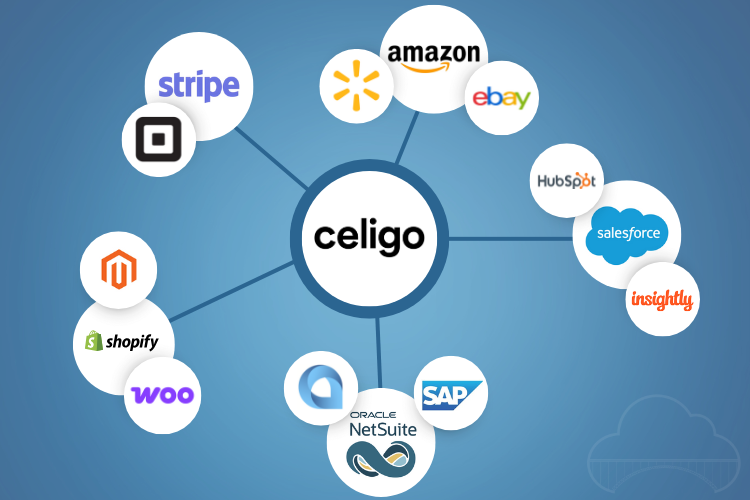
Celigo’s Core Mission
Celigo describes its mission as helping companies achieve process automation at scale. In straightforward terms, that means:
Eliminating manual spreadsheet work
Keeping data accurate and real-time
Creating automated workflows that run continuously
Removing bottlenecks between systems
Allowing teams to focus on strategic work instead of repetitive tasks
The goal isn’t simply connecting systems—it’s automating entire business processes from end to end.
Why Does Celigo Exist? The Problem It Solves
As companies grow, two big problems tend to emerge.
1. Too many applications, not enough integration
A business with 10 or 20 apps might manage with manual exports and imports. But once a company has 40, 60, or more apps, manual processes fail. They often result in:
Double data entry
Inconsistent customer records
Delayed financials
Inventory inaccuracies
Time-consuming reporting
Operational inefficiencies
2. Custom integrations are expensive and fragile
The alternative is building custom integrations through development teams. But custom code:
Breaks when APIs change
Requires constant maintenance
Creates long-term technical debt
Is slow and costly to develop
Does not scale efficiently
Celigo solves these issues by providing a low-code, scalable, and maintainable integration and automation platform.
How Celigo Works
Celigo sits between your applications and helps them communicate through several key components.
Pre-built connectors
Celigo offers ready-made integrations for popular apps such as NetSuite, Salesforce, Shopify, Zendesk, Snowflake, Stripe, Amazon, HubSpot, and many others (over 300 to be specific).
Visual automation builder
The Flow Builder allows users to create workflows using drag-and-drop tools rather than writing complex code.
Universal connectivity tools
For applications without pre-built connectors, Celigo supports:
REST and SOAP API connections
Webhooks
Database connectors
FTP/SFTP integration
Flat file processing
Monitoring and error management
A central dashboard shows:
Successful flows
Failed flows
Error causes
Steps needed to resolve issues
Templates and Integration Apps
Templates act as reusable building blocks.Integration Apps are fully packaged integrations for use cases like:
Shopify to NetSuite
Amazon to NetSuite
Salesforce to NetSuite
Stripe to ERP systems
These solutions are production-ready and maintained by Celigo itself.
Key Features and Capabilities of Celigo
Celigo’s functionality can be grouped into a few major categories.
1. End-to-End Process Automation
Celigo goes beyond simple app-to-app data sync. It can automate entire processes such as:
Order-to-Cash
Lead-to-Customer
Procure-to-Pay
Inventory Management
Fulfillment and Logistics
Returns and Refunds
Subscription Billing
This broadens the scope from individual tasks to entire operational workflows.
2. Pre-built Integration Marketplace
Celigo maintains an extensive catalog of pre-built integrations and templates, which significantly reduces implementation time.
You can explore them here
3. Low-Code Flow Builder
Celigo’s visual builder enables users to design:
Logic-based flows
Trigger-based automations
Multi-step workflows
Complex branching sequences
It is accessible for non-technical users but still flexible enough for developers.
4. API and Developer Support
For advanced technical requirements, Celigo offers:
REST API connectors
SOAP connectors
Webhooks
OAuth 2.0 support
Token-based authentication
JSON and XML support
This ensures compatibility with nearly any modern application.
5. Monitoring, Error Handling, and Replay
Celigo’s monitoring tools allow teams to:
Review the history of every data sync
Identify problematic records
Fix issues directly in the platform
Replay flows after corrections
This is particularly valuable in high-volume environments such as eCommerce or logistics.
6. Security, Compliance, and Governance
Celigo supports essential industry standards and controls, including:
SOC 2
GDPR
HIPAA (select plans)
Role-based access
Audit logs
Data encryption
These features make it suitable for data-sensitive industries such as healthcare and finance.
Who Uses Celigo?
Celigo is used across a wide range of industries, but it is especially common among:
Mid-market companies
Rapidly growing organizations adopting new SaaS tools
eCommerce and retail businesses
NetSuite-heavy environments
SaaS and technology companies
Operations, IT, and finance teams
If your team frequently says things like “Our systems don’t talk to each other” or “We need to reduce manual work,” Celigo likely addresses those issues.
Common Celigo Use Cases
Below are some of the most frequent real-world scenarios where Celigo is applied.
1. eCommerce Automation
Celigo can handle:
Order sync
Inventory updates
Product data synchronization
Shipping and fulfillment flows
Returns and refunds
For instance, a Shopify order can automatically push into an ERP, trigger fulfillment, and send tracking information back to the customer, all automatically.
2. Finance and Accounting Automation
Celigo helps finance teams integrate:
Payment processors
Billing platforms
ERP systems
Bank data
Subscription revenue systems
This reduces manual reconciliations and speeds up month-end closing.
3. CRM, Sales, and Marketing Alignment
Celigo enables CRMs like Salesforce or HubSpot to connect with:
Marketing automation platforms
Customer support tools
ERP or finance systems
Subscription billing systems
The result is cleaner, more consistent customer data across departments.
4. Supply Chain and Logistics
Celigo automates:
Purchase orders
Inventory updates
Vendor data
Shipping notifications
Warehouse management workflows
Manufacturers and distributors frequently use Celigo to streamline their supply chain operations.
Benefits of Using Celigo
Organizations choose Celigo for several measurable advantages:
Reduced manual work and human error
Improved visibility across the business
Enhanced customer experience
Scalable automation
Faster implementation compared to custom development
Lower long-term maintenance costs
When Celigo May Not Be the Best Fit
Celigo may not be ideal if:
You only need simple task-level automation (like automating day-to-day tasks like sending an email when someone fills out a form)
You require extremely enterprise-heavy orchestration
You want fully custom integrations built from scratch without low-code elements
However, for most small, mid-market, and mid-enterprise companies, Celigo offers strong value.
Celigo Pricing Overview
Celigo does not publish fixed pricing, but costs generally depend on:
Number of integrations
Data volume
Workflow complexity
Required features
Use of Integration Apps
More details are available here:
Getting Started Without the Overwhelm
If you’re new to Celigo, you don’t have to dive in all at once. Most people start simple:
Pick one process that’s tedious or error-prone
Set up a basic flow using a prebuilt connector
See the impact
Expand from there
You don’t need a full architecture plan on day one. Just solve the first annoying problem, Celigo can scale from there. You can try it free for 30 days, sign up for a free trial and give it a try.
Final Thoughts
Celigo is fundamentally an automation engine that helps companies integrate their systems, reduce manual work, improve data consistency, and scale operations more efficiently.
Whether you are a business leader, an operations manager, an IT specialist, or simply someone researching integration platforms, Celigo provides a practical and powerful framework for connecting your applications.
Ready to streamline your operations with Celigo? You can learn more about our services or reach out for pricing.
A Few Extras
If you want to dig in a little deeper, here are some resources for "doing your homework":
Celigo FAQs
What systems can Celigo integrate with?
Celigo integrates with hundreds of applications, including NetSuite, Salesforce, Shopify, Amazon, HubSpot, Zendesk, Stripe, Snowflake, QuickBooks, and many more. It also supports custom API connections for software that does not have a pre-built connector.
Is Celigo secure?
Celigo supports major security and compliance standards including SOC 2, GDPR, role-based permissions, encryption, audit logs, and optional HIPAA-compliant features. This makes it suitable for industries that require strict data governance.
What are Celigo Integration Apps?
Integration Apps are fully packaged, ready-to-use integrations built and maintained by Celigo. These apps automate end-to-end processes like Shopify-to-NetSuite, Amazon-to-NetSuite, Salesforce-to-NetSuite, and other high-volume workflows without requiring custom development.
Does Celigo require coding skills?
No, Celigo is a low-code platform. Non-technical users can build and manage flows using the visual interface. Developers can add custom logic, API connections, and advanced configurations when needed.
Is Celigo similar to Zapier or Make?
Celigo is more powerful and is designed for mid-market and enterprise workflows. Zapier and Make focus on simpler task automation. Celigo specializes in end-to-end business process automation and deep integrations with ERPs and mission-critical systems.


Comments